How Can We Help?
Unsyced or Offline Jobs
This post is also available in:  Français
How to deal with unsynced jobs
If you have unsynced jobs, reason can be different and should be investigated singularly.
Unsynced jobs are notified via a red button on the Trucky desktop window header

When the job tracking starts and you see this message – a yellow alert with the exclamation point instead of the green alert, your job is tracked offline.
Trucky tries to sync pending actions with the VTC Hub at every application start.
Trucky will continue to track the job locally but is not submitted to the VTC Hub.

When the job is completed and you see the yellow alert, the job has been successfully logged locally and offline but not submitted to the VTC Hub.

Reasons can be:
- Trucky has no access to internet because of firewall configuration, Antivirus or a faulty install
- Usually this problem is fixed with a full Trucky reinstall.
- Your internet connection is not working
- Don’t worry, your logs will be submitted at next Trucky restart when your connection will work again
- Your internet connection is instable
- Don’t worry, your logs will be submitted at next Trucky restart when your connection will work again
- Trucky server are momentarily unavabile due to maintenance or other events
- Don’t worry, your logs will be submitted at next Trucky restart when servers will be available again
- There was an error server side submitting the job
- You have encountered performance issues internally to Trucky preventing the application to submit jobs properly
If you are experiencing a lot of unsynced jobs also with a good internet connection and Trucky working fine with your firewall, there is something not working correctly and, depending on the cases, you could be the good candidate for the ADE, the Alternative Data Exchange. Please read here to discover more about this feature.
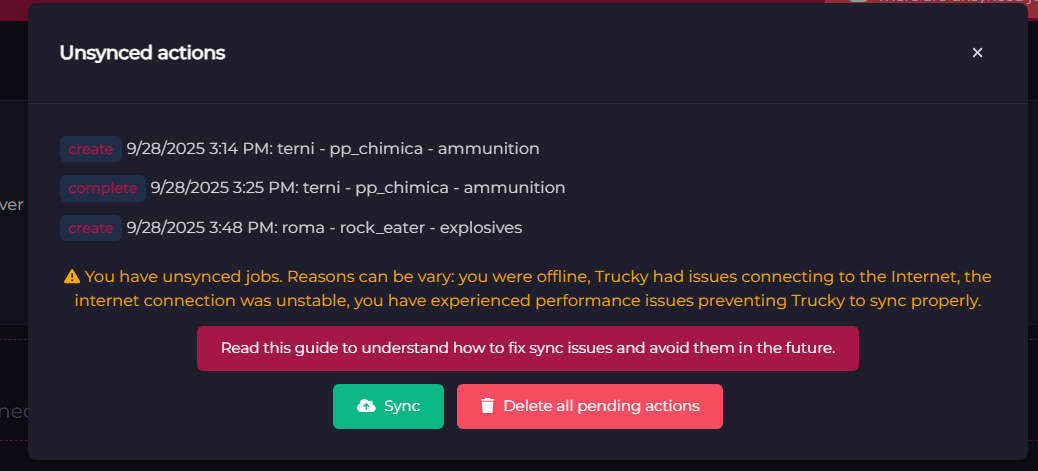
Sync offline jobs manually
Clicking on “Sync”, Trucky should sync all unsynced jobs, in order to maintain the create\complete\cancel event orders.

But sometimes this does not work and so, unfortunately, those jobs are lost and there is nothing we can do to recover them.
Only thing can be done is deleting all pending actions not synced because they are not recoverable.